
Tour review · TOUR REVIEWS
Naples: Pompeii Self Guided Audio Tour
Pompeii becomes story-driven on your phone. This self-guided smartphone audio tour covers major sights like the amphitheater and the House of the Vettii, with 60+ geolocated points that guide you through daily Roman life. It is built for you to wander when you want, then tap a stop to hear the audio, plus see matching photos and text.
I love the value, with pricing far below on-site audioguides, and I love that the audio guide stays available in the ITGUIDES app so you can reuse it on future visits. One real consideration: the app experience is mostly smooth, but you may need to re-find your place on the map after listening or after leaving the app to take photos.
Key Highlights You’ll Care About
- 60+ geolocated points of interest with audio, photo, and text
- Smartphone map that helps you move around Pompeii without guessing
- Offline strategy matters, since internet can be weak in the excavations
- Reuse the guide forever in the ITGUIDES app for future visits
- Short audio sections that let you stop often and keep pace
- No meeting point, you start where you want during open hours
Why a Smartphone Audio Tour Works So Well in Pompeii
Pompeii is big, uneven, and full of distractions. A self-guided audio tour fits the site better than a rigid timeline because you can slow down for what grabs you, then power through the rest. You are not tied to a group, and you do not have to hunt for a guide at a specific corner.
This one is designed to be practical. You use the ITGUIDES app on your phone, and the content is built around real locations. That means you can walk up to a point, tap the corresponding stop, and hear the story there. You get the kind of help that keeps you from only seeing ruins as shapes, and instead lets you understand what you are looking at.
It also helps that the tour is explicitly self-paced and autonomous with no meeting point. So if you arrive early, you can start right away. If you hit a closed walkway due to ongoing restoration, you are not stuck waiting for someone to catch up.
You can also read our reviews of more guided tours in Naples



Price and Value: $4.70 for a 4-Hour Pompeii Companion
At $4.70 per person for a 4-hour visit window, the math is hard to beat. The key is that you are not paying for a live tour guide, you are paying for a phone-based guide plus a map and location-based content. For many visitors, that is exactly the right tradeoff in Pompeii, where you spend most of your time walking between spaced-out highlights.
The value improves for two reasons. First, the price is positioned as a big savings compared with audioguides sold at the ticket office. Second, the audio guide is yours for future use. That is important because Pompeii can take more than one visit to fully absorb. With this setup, you can treat this first visit as the orientation round, then come back later for deeper focus.
Just note the one limitation that comes with phone audio: you are the navigator. The app map makes that easier, but it is still on you to keep your phone charged and to follow the route.
Setting Up ITGUIDES Before You Enter Pompeii
Do the tech part before you buy shoes for war, meaning before you hit the ruins. The process is straightforward, and the tour is built around the ITGUIDES app.
Here is the workflow you should expect:
- Download the ITGUIDES app from your phone store.
- After you purchase, open the app and go to the menu and contact page.
- Send your app user ID and your GetYourGuide order number from your voucher.
- The Pompeii guide is enabled for your device, then you can start using it.
The tour also includes a map and geolocated stops, and it supports multiple languages: Italian, English, French, German, and Spanish.
One big practical tip: the excavations can have poor cellular service. The guide specifically recommends downloading the content locally before going in, so your audio and map work reliably once you are inside. A lot of frustration in ruined sites comes from weak signal. This guide is trying to prevent that by pushing you to prepare first.
Also, you can download the ITGUIDES app and try a free demo before buying. If you are new to audio-on-demand apps, that demo is worth your time.
How the Geolocated Map Keeps You From Getting Lost
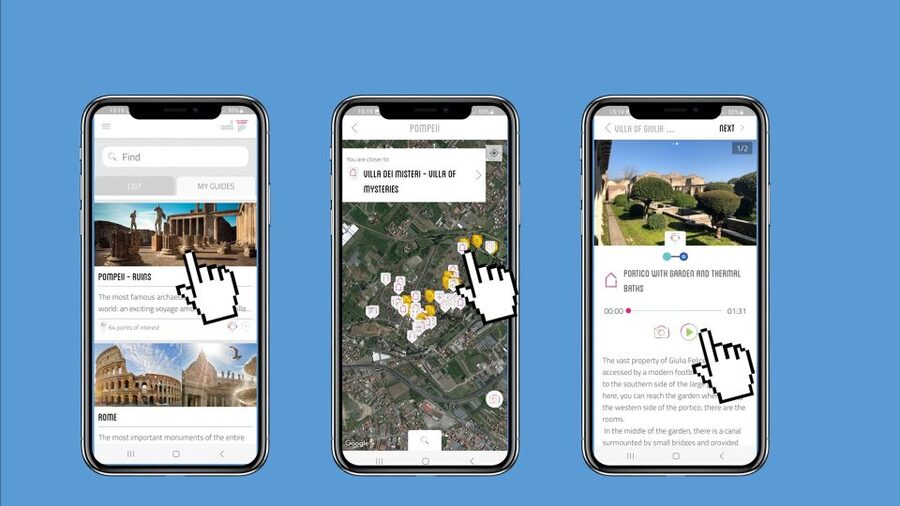
In a place like Pompeii, you either use a guide tool or you accept that you will miss connections. This app leans hard into location. You get more than 60 geolocated points, and each point includes audio plus descriptions in hypertext. Some of that text is clickable, so if you see a reference to gods, heroes, or technical terms, you can tap for extra context.
When it works, it is a confidence boost. The map is interactive, and it can show what points you have already visited. That helps you avoid the classic problem of hearing one great audio clip, then forgetting which stops you have already completed.
There are also a couple of real-world quirks to consider based on how people experience the interface:
- If a location has more than one audio clip, the map marker that shows completion may not appear perfectly.
- After listening, the app can bounce you back to the map view in a way that makes you zoom back in to find your location.
None of those issues ruin the tour, but they are good to know. If you are the type who hates fiddling with your phone while walking, you will want to go in with the mindset of, yes, you will need a few taps now and then.
Amphitheater Stories You Can Hear While You Stand in Place

The amphitheater is one of Pompeii’s most recognizable structures, but without context it can still feel like a pretty ruin. The audio guide is designed to fix that by giving you stories and explanations right where you are standing.
This is the kind of stop where audio-on-site makes sense. You look at seating, entrances, and the scale of the space, then the narration helps you imagine how it functioned. You do not have to read a big panel or try to translate your way through technical details. You just walk, tap, and listen.
What I like about this approach is the pace. You can spend one focused audio segment here, then keep moving, or you can hang around for a second listen while your brain catches up to what the structure is showing you.
The only caution is practical: some areas in Pompeii can be closed during visits because of restoration work. The amphitheater is a major draw, so plan to be flexible. If a certain entry route is off limits, you can still use the map to find the best reachable path to other points.
More Naples tours, ruins, coast days, and city experiences to compare






The House of the Vettii: Frescoes, Floors, and Roman House Life

The House of the Vettii is a top Pompeii highlight for a reason. Houses in Pompeii are where you start to understand that these were not just stone shells, they were everyday environments for real people.
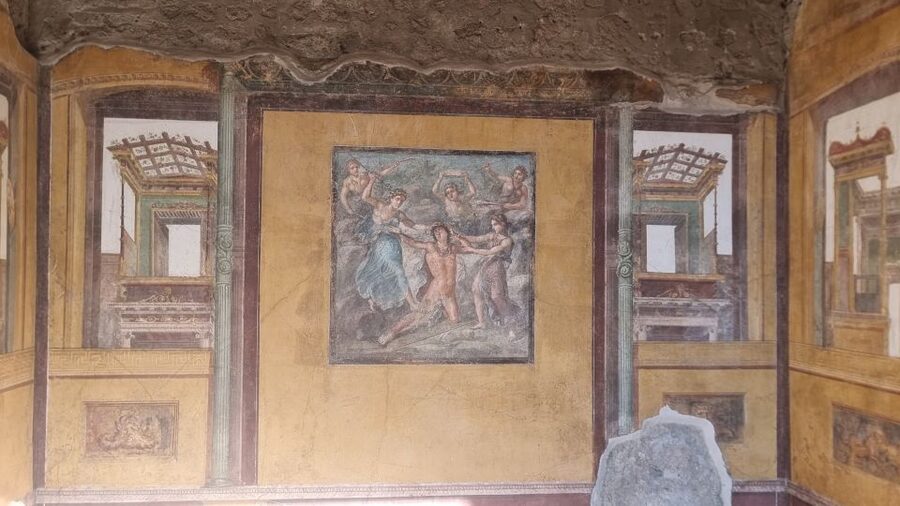
With this guide, you get audio plus descriptions that help connect visible details to the way the household worked. The House of the Vettii is also a place where frescoes and other decorated surfaces often catch your eye first, then make you wonder what you are actually looking at.
The app’s geolocated structure helps you avoid wandering in circles. You can move from one stop to the next, and the content is tied to specific locations. That means you are less likely to miss key rooms or overlook a detail because you are only doing quick visual scanning.
One small reality check: not every room will have the same level of access on every day. Ruins can limit what you can physically see. When that happens, the best use of this guide is to listen to the audio for the areas you can reach, then use the map to jump to the next location that is open.
Lupanare Stop: Roman Leisure, With a Heads-Up Tone

The lupanare is not a casual topic, and Pompeii is not shy about showing uncomfortable parts of history. This guide includes stories and curiosity around the lupanare, and it places it into a broader picture of Roman life.
This is one of those stops where audio can actually be safer than text-only reading, because narration can set context and keep the tone appropriate. It is also useful because you can keep walking at a pace that works for you, rather than getting stuck trying to absorb dense information while standing in a crowded spot.
If you are traveling with kids, this is the area where you should make your own call. The guide includes it as a point of interest, but the key is whether the content fits your group’s comfort level.
Roman Baths, Taverns, and How Daily Life Actually Worked

One of the best things about this audio guide is that it does not only focus on the big monuments. It also covers the systems and habits that made Pompeii feel like a living city.
You can expect explanations about how Roman baths worked, including how the space functioned as people moved through different parts of the bathing routine. It is one of those topics where being in the right spot matters, because you can visually match the narrated explanation to physical features you see.
The guide also includes the kinds of details that make the past feel less abstract. It talks about what people ate in Roman taverns, how bread was made, and even how urine was used for wool processing. That last detail sounds wild on paper, but that is exactly why Pompeii audio works so well. It turns a ruin into a working model of an ancient economy and daily routines.
Here is the practical takeaway for your visit: when an audio stop connects to something you can still see in the architecture, it makes the whole site easier to understand. It is not just impressive, it is instructional.
Frescoes and Mosaics: Use the Map to Target the Best-Preserved Details
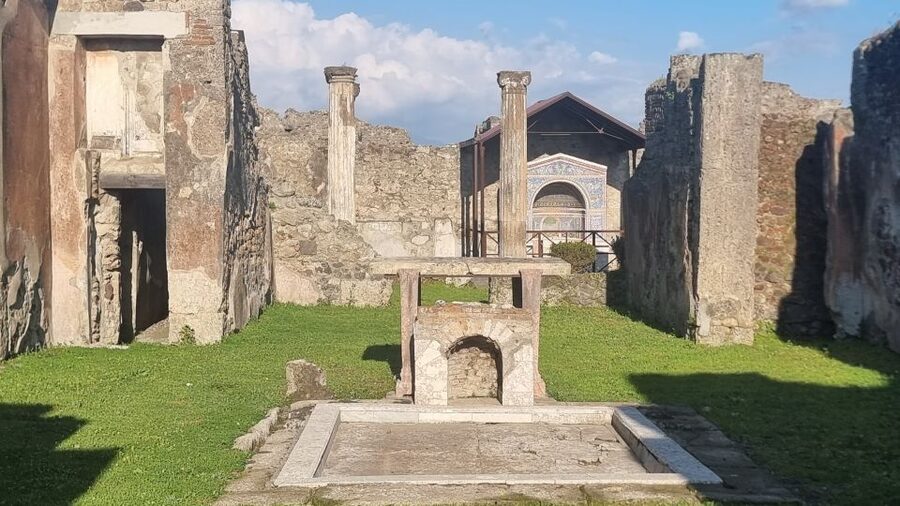
Pompeii’s visual rewards are real, but they are also easy to miss if you only follow your eyes. This guide uses the map to point you toward the most beautiful and best preserved frescoes and mosaics.
That matters because restoration status can change how much you can actually see. If a section is closed or damaged, the app helps you shift to other points that are reachable and worth your attention. It also helps you stop turning into a tourist photo machine, since you are deciding to look at specific works instead of hoping your instincts pick the right ones.
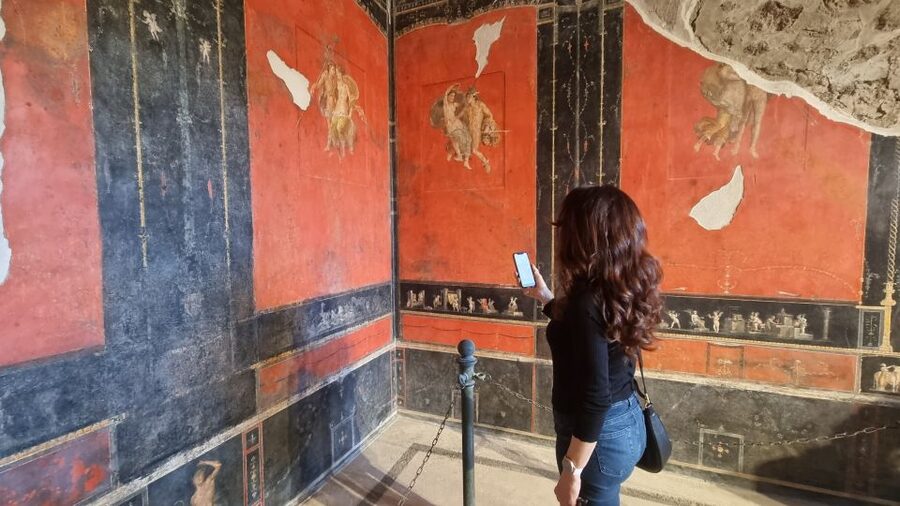
The audio and text are paired with each point, so if you see a colorful surface and wonder what it depicts, you can tap for the explanation instead of moving on immediately. That is a big quality-of-life improvement in a sprawling site.
Ongoing Restoration, Closed Areas, and Staying on Track
Pompeii has active restoration work. Some places can be closed, even if they are famous. The good news is that this is a self-guided app-based experience. You are not stuck in a fixed route with no flexibility.
When something is closed, you can treat your visit like a set of reachable stops. Use the map to pick the next location that is open. Then listen to that audio while it is relevant to where you are standing.
In a way, this makes the tour feel more like real exploration. You are not forcing the site to match your plan. You are letting the day’s access shape your route, which is exactly how you get the most out of ancient sites.
Wheelchair Accessibility and Practical Phone Habits
This activity is listed as wheelchair accessible, which is a helpful baseline if you are planning a mobility needs trip. Still, Pompeii itself has uneven ground and site-specific limitations, so you will want to plan with care and choose accessible routes.
On the phone side, treat your battery like a museum ticket. Download the content locally before you go. Keep your phone in good light for navigation. If you notice the map does not bounce you right back to your exact position after listening, do not panic. Zoom back in and re-check your current location. A little patience here saves hours of wandering.
If you tend to take lots of photos, be aware the app experience can be sensitive to switching out of the app. So if you can, take a photo, return to the audio screen, and then continue. That keeps the tour flow smoother.
Who This Works For, and Who Might Prefer a Live Guide
This Pompeii audio tour fits you best if you want:
- Self-paced touring instead of a group schedule
- A budget-friendly option for a major site
- Clear location-based guidance to help you navigate the ruins
- Enough context to understand big stops like the amphitheater and the House of the Vettii
- Multiple languages if you are traveling with someone whose preferred language differs
It can be less ideal if you need a lot of real-time human adaptation. For example, if you want someone to answer questions on the spot, adjust on the fly based on crowd levels, or steer you through the site with constant coaching, you might prefer a live guide.
Also, if you hate phone navigation under stress, you should only book this if you feel comfortable with basic app control. A few interface quirks are possible, and your willingness to tap and zoom matters.
Should You Book This Pompeii Self-Guided Audio Tour?
Book it if you want a low-cost way to get structure in a huge place. At $4.70 for a 4-hour window, plus geolocated stops, offline-minded downloads, and the ability to reuse the guide later, it is strong value. You also get major Pompeii anchors like the amphitheater, the House of the Vettii, and the lupanare, along with practical explanations that go beyond monuments.
I would hesitate only if you expect the app to feel effortless all the time. The navigation can need a little re-centering after audio playback, and switching out of the app for photos can cause it to behave oddly. If that kind of friction would make you miserable, consider a live guide or a hybrid plan.
If you can handle a little phone fiddling and you want maximum freedom, this is a smart way to experience Pompeii.
FAQ
Is the Pompeii site entrance ticket included?
No. The tour includes the audio guide on the ITGUIDES app, but the Pompeii site entrance ticket is not included.
Do I need a meeting point to start?
No. This is an autonomous self-guided activity, and there are no meeting points.
How do I access the audio guide after purchase?
Download the ITGUIDES app, then in the app menu use the contact page to send your app user ID and your GetYourGuide order number from your voucher so the Pompeii guide can be enabled on your phone.
Can I use the audio guide offline?
You should download the guide contents before going in, because internet connection in the archaeological site is not good.
How long is the tour valid?
The guide is valid for 4 hours from the first activation.
What languages are available?
The audio guide is available in Italian, English, French, German, and Spanish.
How many points of interest does the tour include?
It includes more than 60 geolocated points of interest, each with audio and supporting photo/text content.
Is this tour wheelchair accessible?
Yes, it is listed as wheelchair accessible.
Will the guide work only once?
No. The audio guide will be yours to reuse on future visits.
What if I cancel my booking?
Free cancellation is available up to 24 hours in advance for a full refund.
Is there a free demo before I buy?
Yes. You can download the ITGUIDES app and try the free demo before purchasing.
More Guided Tours in Naples



More Tours in Naples





More Tour Reviews in Naples

Not for you? Here's more nearby things to do in Naples we have reviewed











Tour Reviews, compared.
 ★ 4.8Pompeii: Entry Ticket and Guided Tour with an ArchaeologistFrom $3519,459 reviews
 ★ 4.2Pompeii: Entry Ticket with Optional Audio GuideFrom $2612,360 reviews
 ★ 4.8Pompeii: Small Group Tour with an ArchaeologistFrom $4012,264 reviews
 ★ 4.3Pompeii Ruins & Mount Vesuvius Day TourFrom $12011,459 reviews
 ★ 4.6Sorrento, Positano and Amalfi Full-Day TourFrom $10710,988 reviews
 ★ 5.0Sorrento, Positano & Amalfi Coast – Small Group TourFrom $768,643 reviews
 ★ 4.6Catacombs of San Gennaro Entry Ticket & Guided TourFrom $157,941 reviews
★ 5.0Pompeii Small Group Tour with an ArchaeologistFrom $356,593 reviews
★ 4.6Catacombs of San Gennaro Entry Ticket & Guided TourFrom $157,941 reviews
★ 5.0Pompeii Small Group Tour with an ArchaeologistFrom $356,593 reviews
Browse the lists this tour appears in