

Tour review · TOUR REVIEWS
Pompeii Audioguide – TravelMate app for your smartphone
Pompeii can feel huge, but this keeps you moving. With the TravelMate smartphone audioguide, you can plan your visit around what you want to see, then press play as you go, with no paper ticket to collect. I like that you’re not stuck in a group schedule, and you can revisit the same audio again and again.
Two things I especially appreciate: the guide is built for autonomy (download, activate, start anywhere), and it lets you listen online or offline. One thing to consider is that a more strict “how do I get it working right now?” setup can frustrate you at first, and if you rely on online playback you may need decent signal.
Key things to know before you start

- No meeting point: download the app and start straight away wherever you are in Pompeii
- 1095 days of access: replay the audio content after your first activation, without rushing
- Offline or online: you can listen without data once you have the audio working on your device
- 16 audio segments, 48 minutes total: short, focused chunks instead of one long lecture
- You can read the text: if you prefer captions or want to skim
- Includes a quiz section: quick questions to keep you engaged
Why a self-guided Pompeii audio tour actually helps
Pompeii is one of those places where you can easily get lost in your own questions. The streets and buildings are close together, but the story behind them can feel scattered unless someone helps you notice the right details. This smartphone audio guide is designed to be that sidekick, in your pocket.
The big value here is control. You decide when to stop, how long to linger, and which sites you want to emphasize. If you like to photograph, pause for viewpoints, or walk slower because of crowds, the format supports that. You are not tied to the next “important stop.”
And because it is a TravelMate app experience, you do not have to handle paper vouchers or a separate device. For many people, that alone is the difference between a smooth day and a stressful one. You also avoid sharing headsets or other equipment with strangers, which is a practical comfort when you are traveling.
More Naples tours, ruins, coast days, and city experiences to compare



Price and value: is $9 enough?
At $9 per person, you are buying a compact, self-paced set of audio content rather than a full guided tour. That can be a great deal if you want history and context without the cost and logistics of a live guide.
The value comes from the combination of:
- Replay for 1095 days after first activation, so you can revisit the audio later or re-listen in the same trip
- 16 audio contents totaling about 48 minutes, which fits nicely into a half-day rhythm
- Multiple languages (Italian, English, Spanish, German, Russian, Chinese, French)
Still, it is not meant to replace every layer of interpretation. If you expect constant “fun facts,” a dramatic narrative style, or extremely deep coverage of every area you might wander into, you might feel a bit short-changed. One reviewer’s take was that the narration can feel more like steady information than gripping storytelling.
So think of this as a great “starter guide” for orientation. If you want more than that, you may still want a traditional audio guide or a guided tour for extra depth.
Getting the TravelMate app and activation code working

There is no meeting point, which is liberating, but it means your day starts with your phone. The good news is you can begin where you prefer, right after you download.
Download step
- For Android: open the Play Store and download the app called TRAVELMATE
- For iOS: open the App Store and download TRAVELMATE TM
Activation code sources (important)
Your 10-digit activation code is in the email, inside the barcode area:
- Click Show activity details or Show your tickets here
- Tap the large barcode in the orange frame
- A window opens with the barcode
- The activation code is the small 10-digit number just under the barcode
If you use the GetYourGuide app:
- In the email, tap Show ticket in the App
- Tap the big barcode in the orange frame to reveal it
- You may be redirected to download GetYourGuide if needed
Practical tip: before you go to Pompeii, try to sign in and confirm the app is working on Wi-Fi. At least, test that audio starts. That reduces the chance of feeling stuck once you’re at the site.





How you use it on-site, online or offline

The guide is built to be flexible:
- You can listen online
- Or listen offline
- You can also read the text for the audio files in the app
In real life, that means you can match your experience to your phone signal. Pompeii can mean mixed connectivity depending on where you are standing. One reviewer specifically noted that you need decent signal for online listening to work properly. So I strongly recommend setting things up so offline playback is ready before you get far.
Earphones matter
Earphones are recommended. Pompeii is lively, and even when it is not crowded, sound carries. Earphones help you focus on the narration and cut down on distractions.
Choose your pace
The total audio length is about 48 minutes across the 16 content segments. That is a useful detail because it lets you plan. If you are walking at a steady pace with short stops for photos, you can finish within an enjoyable timeframe. If you slow down, it becomes a guide that you dip into rather than a strict “finish the loop” challenge.
Your 48-minute audio walk: the 16 stops you’ll hear

This audioguide includes 16 audio contents with a combined duration of 48 minutes. Each segment corresponds to a named point of interest, so you can follow it as a light route or treat it as a choose-your-own-adventure.
Below is how to think about each stop, what it is likely meant to help you notice, and where you might want to watch your expectations.
Pompeii Introduction
Start here if you want orientation. The introduction is your best chance to understand how the guide is framing the overall city, so the later stops land better. If you are the type who likes context before wandering, this segment is worth your time.
Frescoes
When you hear Frescoes, look for wall decoration and paint remnants. This is the kind of stop where audio can help you see beyond the obvious. The drawback is that if you were hoping for very detailed “what this exact motif means” explanations, the short segment length may feel limited.
Grand Theatre – Regio VIII
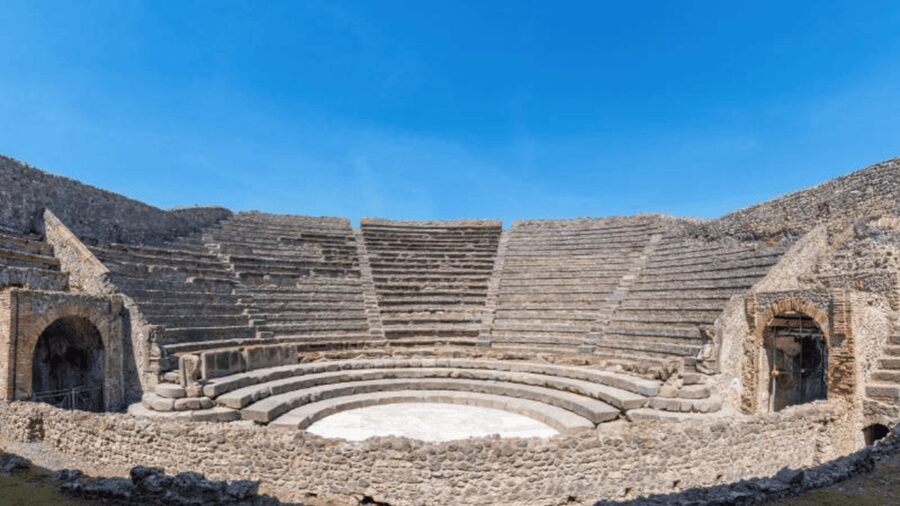
A theatre stop is helpful for giving you a way to connect space with community life. Even if you do not know the names of every architectural element, the narration should point your attention in the right direction. For photographers, theatres often reward patience, so allow a little extra time here.
Basilica of the Friars
A religious building stop typically gives you a sense of civic or social structure, not just the physical shell. Keep in mind that the audio segments are brief. You’ll get a guided lens, not an exhaustive course, so it works best when you pair it with your own slow observations.
Houses of Marcus Rufus and the Golden Bracelet – Regio VI
This is a “domestic life” themed stop, the kind that helps you shift from monumental spaces to everyday rooms. The plus is that it can add variety to your walk. The consideration is that house stops can be crowded or partially restricted depending on conditions on the ground, so build in flexibility and do not assume you’ll spend the same time everywhere.
Lupanare – Regio VII
This segment sounds like it addresses a specific kind of building. It can be a reality-check stop that keeps Pompeii from feeling like only temples and big streets. If you prefer to skip sensitive topics, listen once and then decide how much time you want to spend observing.
Temple of Apollo – Regio VII
Temples tend to be visual anchors. An audio stop like this is useful for helping you look for how the space is organized and why it mattered. Because the total audio is only 48 minutes, treat this as a guide to what you should notice first, rather than a full explanation of every detail.
The Roman Domus
A domus stop is perfect for people who want to understand how homes functioned. Even if you have never studied Roman architecture, the audio should help you recognize the basic idea of a house layout. If you like learning through clear pointers, this is one of the segments most likely to feel satisfying.
Thermae – Regio VII
Thermae are often a favorite topic because they shift the tone to daily routines like bathing and socializing. This segment can make you watch for clues in the space rather than just reading signs. The downside is the same: the audio is short, so you might still want a reference book or a more extensive tour if you want every last feature explained.
Regio VII and Regio VIII coverage, as a theme
Even without giving you hyper-specific maps, the guide clearly organizes stops by Regio areas. That is helpful because it gives your brain a way to file what you see into manageable chunks, instead of feeling like you’re wandering without structure.
Quiz mode: learning without the pressure

One of the included extras is a quiz section with short questions about the city. This is not just a gimmick. It is a quick way to turn the audio you just heard into something you remember.
Here is how to use it well:
- Take the quiz after you finish a few segments, not right at the start
- Use it to decide what to re-listen to
- Treat it like a self-check, not like homework
If you enjoy interactive learning, this adds value to the app beyond plain narration.
Languages and the text option for different styles

The guide is available in Italian, English, Spanish, German, Russian, Chinese, French. That matters because you can choose the voice that feels natural to you, which changes how much you enjoy listening.
I also like that you can read the text for the audio files. Some days you will be tired from walking, and audio can feel like too much. In that case, skimming the text can keep you engaged without losing the context.
Wheelchair accessibility

This activity is listed as wheelchair accessible. If you use a wheelchair or mobility aid, it is still smart to plan for uneven surfaces and changing access inside an archaeological site, but the app itself is a good choice because it does not rely on entry into a specific vehicle or guided group route.
Crowd level and what the “no meeting point” really changes

A self-guided format changes your crowd experience. You do not have to wait at a specific time beside others. You can start when you feel ready, and you can move away if an area feels packed.
One of the positive takeaways in the feedback was that the audio guide worked well when there were not too many visitors. That is a reminder that your experience can improve a lot if you visit at a calmer time of day.
Where this audioguide shines, and where it might not
Let’s be honest. This product can be a perfect match, or it can feel like a “cheap version” of more thorough guidance depending on what you want.
You’ll likely love it if you want:
- Autonomy and no group schedule
- A short, structured route (48 minutes of audio across 16 stops)
- Replay value for the future (1095 days)
- Offline flexibility
- A built-in quiz and the option to read the text
You might feel disappointed if you want:
- Extremely gripping, story-driven commentary
- Deep coverage for every corner you might explore
- An experience that works flawlessly without planning for signal
One reviewer called out startup difficulty and described the delivery as droning for a couple of minutes per point. Even if you do not feel that way, it’s a signal to set expectations: these are short segments, and you may need to supplement them with your own curiosity or a more complete guide on days when you want extra depth.
Should you book the Pompeii Audioguide with TravelMate?
Book it if you want a low-cost, flexible Pompeii plan that keeps you moving and gives you context without extra logistics. At $9, the value is strongest if you like self-guided travel, want offline capability, and plan to spend enough time at the main interest points to let the audio sink in.
Skip it or upgrade if you want a highly narrative tour with constant new information, or if you know you will struggle with app setup on your phone once you arrive. In that case, a more traditional audio guide or a live guide may feel more satisfying.
If you do book this, do yourself one favor: get the app downloaded and the audio working before you go deep into the site. Once it’s ready, you’ll enjoy the freedom of listening as you go, with a guide that does not expire and fits your pace.
FAQ
Do I need a meeting point to start?
No. There is no meeting point for this activity. You download the app and start your experience straight away wherever you prefer.
How much does the Pompeii Audioguide cost?
The price is listed as $9 per person.
How long is the audio guide available after activation?
It is valid for 1095 days from the first activation.
Does it work online and offline?
Yes. You may listen to the audio guide online or offline.
Can I read the audio content text in the app?
Yes. You may read the text of the audio files in the app.
What languages are included?
The audio guide is included in Italian, English, Spanish, German, Russian, Chinese, and French.
How do I get the activation code?
Your 10-digit activation code is available in your email inside the barcode details, or you can access it via the GetYourGuide app using the ticket option.
Is the experience wheelchair accessible?
Yes. The activity is listed as wheelchair accessible.
More Self-Guided Tours in Pompei Campania


More Tour Reviews in Pompei Campania


Not for you? Here's more nearby things to do in Pompei Campania we have reviewed












Tour Reviews, compared.
 ★ 4.8Pompeii: Entry Ticket and Guided Tour with an ArchaeologistFrom $3519,459 reviews
 ★ 4.2Pompeii: Entry Ticket with Optional Audio GuideFrom $2612,360 reviews
 ★ 4.8Pompeii: Small Group Tour with an ArchaeologistFrom $4012,264 reviews
 ★ 4.3Pompeii Ruins & Mount Vesuvius Day TourFrom $12011,459 reviews
 ★ 4.6Sorrento, Positano and Amalfi Full-Day TourFrom $10710,988 reviews
 ★ 5.0Sorrento, Positano & Amalfi Coast – Small Group TourFrom $768,643 reviews
 ★ 4.6Catacombs of San Gennaro Entry Ticket & Guided TourFrom $157,941 reviews
★ 5.0Pompeii Small Group Tour with an ArchaeologistFrom $356,593 reviews
★ 4.6Catacombs of San Gennaro Entry Ticket & Guided TourFrom $157,941 reviews
★ 5.0Pompeii Small Group Tour with an ArchaeologistFrom $356,593 reviews
Browse the lists this tour appears in